Types of Plan Actions
All plans are displayed in a table that enables users to display and manage different connectivity plans.
A screen capture of the Plans table is shown here.
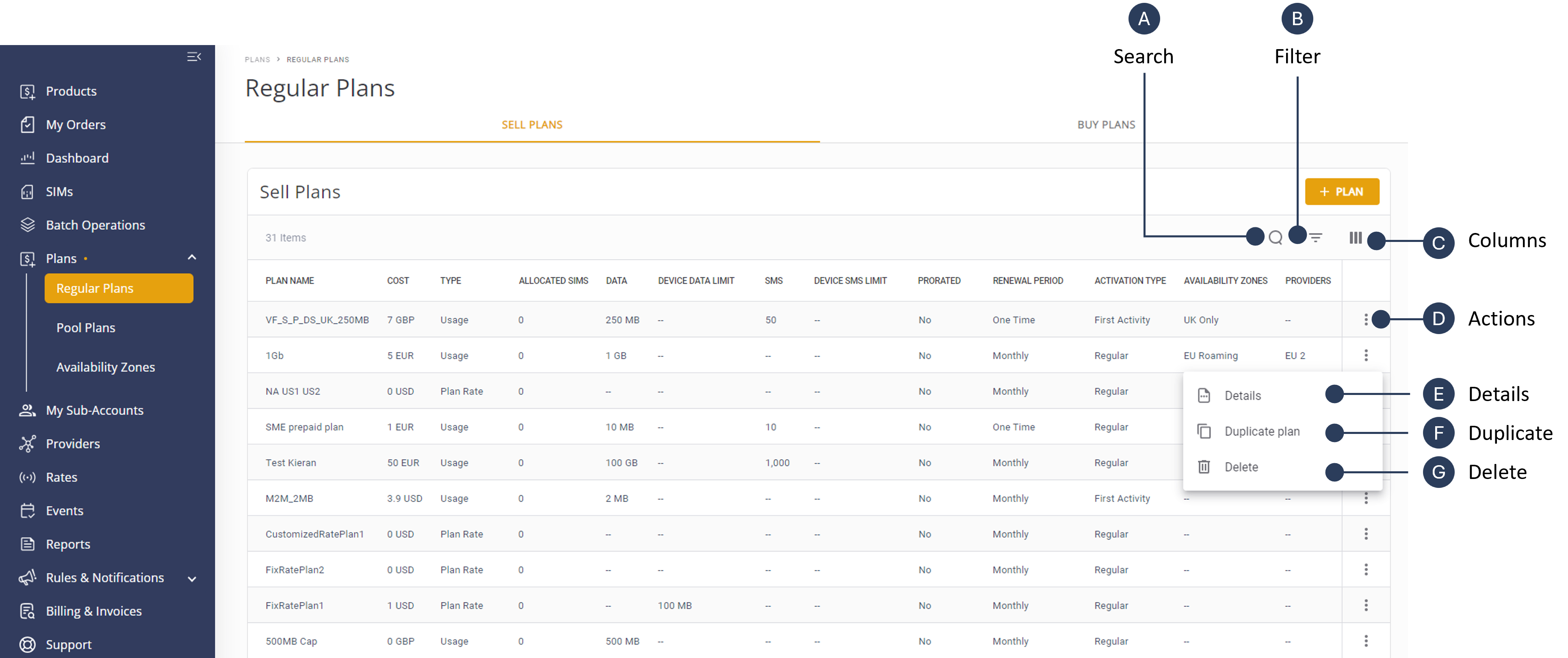
A description of the Plan actions is provided in this table.
| Action | Description | |
|---|---|---|
| A | Search Plans | Enables you to quickly find specific plans by entering a full or partial plan name. Refer to Search Plans |
| B | Filter Table | Use the filter action to refine the displayed plans based on criteria, such as plan type, price range, renewal period, activation type, prorated or name of external parameter. Refer to Filter Plans. |
| C | Select Columns | Customize the table columns to show, hide and order specific data fields in the plans table. |
| D | Actions | Lists the actions for a specific plan displayed in the table (Details, Duplicate and Delete) |
| E | View Details | View detailed information about a selected plan. This includes information about plan costs, plan type, assigned SIMS, pricing, activation type, renewal period, availability zones and service providers. Refer to View Plan Details. |
| F | Duplicate Plan | Create a copy of an existing plan to replicate similar plans without starting from scratch. When a plan is duplicated, all plan attributes are copied over, allowing users to make any necessary adjustments to details such as rates, availability, or specific features before saving the new plan. Refer to Duplicate Plan . |
| G | Delete Plan | Remove out-dated or irrelevant plans from the system. Refer to Delete Plan. |